

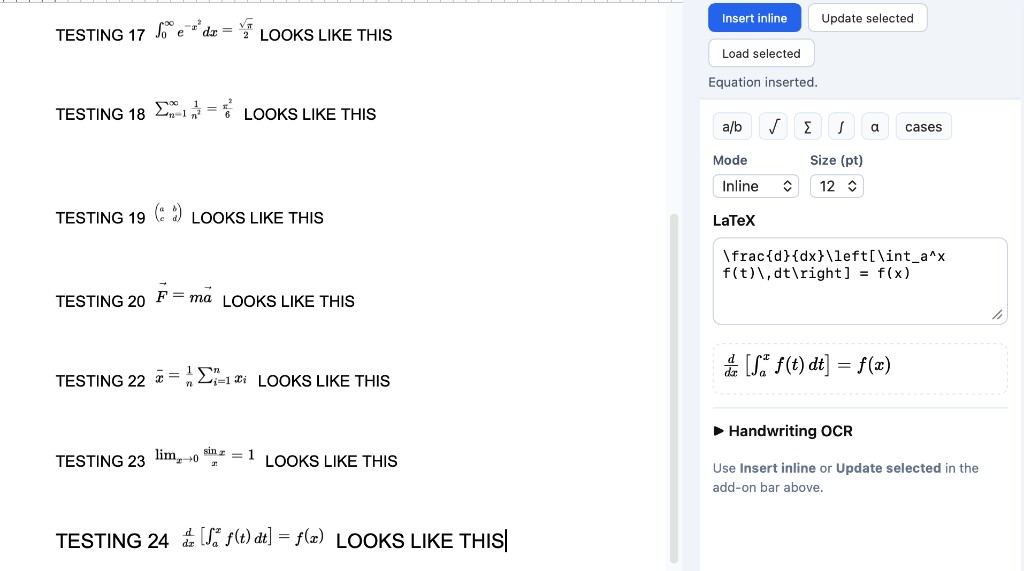
Others
The velocity is
v = ΔxΔt
in this experiment.
✗ Floats above the line
WriteMath
The velocity is
v = ΔxΔt
in this experiment.
✓ Sits on the baseline
Others
Opening editor… 2–4s
✗ Spinner on every insert
WriteMath
✓ Inserted instantly
✓ No wait loop
Others
\sum_{i=1}^{n} x_i^2
✗ LaTeX syntax required
WriteMath
"sum from 1 to n of x squared"
∑i=1n x²
✓ Plain English works
Others
???
Price hidden until signup
✗ Surprise paywall
WriteMath
$42/yr
15% below typical pricing · upfront
✓ Price shown first
Others
Connection required
✗ Breaks offline
WriteMath
Works on patchy Wi‑Fi
✓ Built for classrooms
What’s included
Everything you need.
Nothing you don’t.
Full parity with the best math-editor features—plus the things that matter most inside Google Docs.
Core fix
True inline equations
Equations render at the correct baseline, size, and line-height of your surrounding text.
Core fix
Instant, client-side rendering
No “open editor → wait → insert” loop. Fast inserts keep you in flow.
New
Natural language → LaTeX
Type “sum from 1 to n of x squared” and get the equation instantly. No syntax memorization.
Parity
500+ symbols
Greek, operators, matrices, multiline, arrows—full coverage for everyday teaching and research.
Parity
Handwriting OCR
Write on a tablet/touchscreen. Converts to clean, editable LaTeX for quick refinement.
Parity
Chemistry toolbar
Periodic table, bonds, and common inorganic symbols—built for science teachers and lab docs.
Parity
LaTeX & WYSIWYG modes
Power users type LaTeX. Everyone else uses visual editing. Switch any time.
New
Equation library
Save reusable equations. Shared libraries for teams and school departments on group plans.
Offline-friendly
Works with patchy Wi‑Fi
Designed for classrooms and campuses. Your workflow shouldn’t collapse when the network is flaky.
Side by side
How we compare (in Google Docs)
Focused on Docs-specific issues that affect polish, speed, and shareability.
Feature
WriteMath
Others
Inline baseline rendering
✓ Always inline
✗ Often floats/misaligns
Insert speed
✓ Fast, low-friction
✗ Noticeable wait loops
Offline resilience
✓ Designed for flaky Wi‑Fi
✗ Often needs connection
Transparent pricing
✓ On this page
✗ Commonly discovered late
Natural-language input
✓ Included
✗ Not included
Symbols & LaTeX
✓ Full coverage
✓ Full coverage
Price (individual)
✓ $42/yr (15% less)
$49.95/yr
Trust & compliance
Built for schools, teams, and procurement
Clear answers: what’s stored, what permissions are required, and how admins control access.
Privacy-first defaults
Configure so equation content isn’t stored long-term, and keep permissions least-privilege.
Transparent permissions
Explain exactly what the add-on can access and why, in plain language for IT review.
Admin-friendly rollout
Support domain installs, group assignment, seat management, and clear cancellation behavior.
Replace these with your real statements (data retention, stored fields, deletion path, DPA links, etc.).
Pricing
Honest pricing. Shown upfront.
15% below typical annual pricing (~$50/yr). Choose monthly or annual. Cancel anytime.
Free
$0
forever
For light users and students who write occasional equations.
- ✓ 30 equations / month
- ✓ Symbols + LaTeX input
- ✓ Inline rendering
- ✓ Google Docs + Slides
Most popular
Individual
$42
per year · or $3.50/month
For teachers, researchers, and writers who use equations daily.
- ✓ Unlimited equations
- ✓ Natural-language input
- ✓ Handwriting OCR
- ✓ Chemistry toolbar
- ✓ Equation library + history
- ✓ Offline-friendly
Team / School
$3.50
per user/month · billed annually
For departments and districts. Same 15% below typical per-seat pricing. Volume discounts for 50+.
- ✓ Everything in Individual
- ✓ Shared equation libraries
- ✓ Admin console + seat controls
- ✓ LMS integration (Canvas, Moodle)
- ✓ Priority support
FAQ
Quick answers (for buyers and admins)
The objections that usually block installs in schools and Workspace teams.
Does it work in Google Slides too? ⌄
Write Math is focused on Google Docs. Slides insertion is not currently supported — equations inserted in Docs stay in Docs.
What permissions does it require? ⌄
The add-on requests access to insert content into the current Google Doc (the standard
documents.currentonly scope). It does not read or transmit your document text — it only inserts the equation you choose.Do you store my document content? ⌄
No. Equation rendering is done entirely client-side using KaTeX. We never see or store your document text. The only data we retain is your email address (for license management) and your OCR usage count.
Does it really work offline? ⌄
Equation rendering is fully client-side and works without internet once the sidebar is loaded. Natural-language-to-LaTeX and handwriting OCR require a connection — those features call our AI API. Loading the sidebar for the very first time also needs a connection.
How do I cancel? What happens to existing equations? ⌄
Cancel any time from your dashboard with one click. Equations you've already inserted are stored as images inside your document — they remain visible and printable forever, even after cancellation. You lose access to inserting new equations.
Can admins deploy to groups or domains? ⌄
Yes. Workspace admins can install Write Math domain-wide or to specific groups directly from the Google Admin Console, just like any other Marketplace add-on. For volume licensing or a custom quote, email help@brilliantapps.org.
Stop apologizing for
sloppy-looking equations.
Try it free for 30 days. No credit card. Installs in about a minute.